On October 7, 2026, Microsoft announced general availability of Microsoft Execution Containers (MXC) on Windows 11 and unveiled a hybrid intelligence architecture that lets Copilot run locally with access to your PC's context, files and local AI models. The move, revealed at the Windows AI and Surface event in San Francisco, turns Windows into a containment platform for AI agents, letting IT teams define which files and networks each agent can touch and enforcing those policies at runtime. For UAE businesses already testing GitHub Copilot, Claude or OpenAI's Codex in production, this changes the security and speed equation overnight.

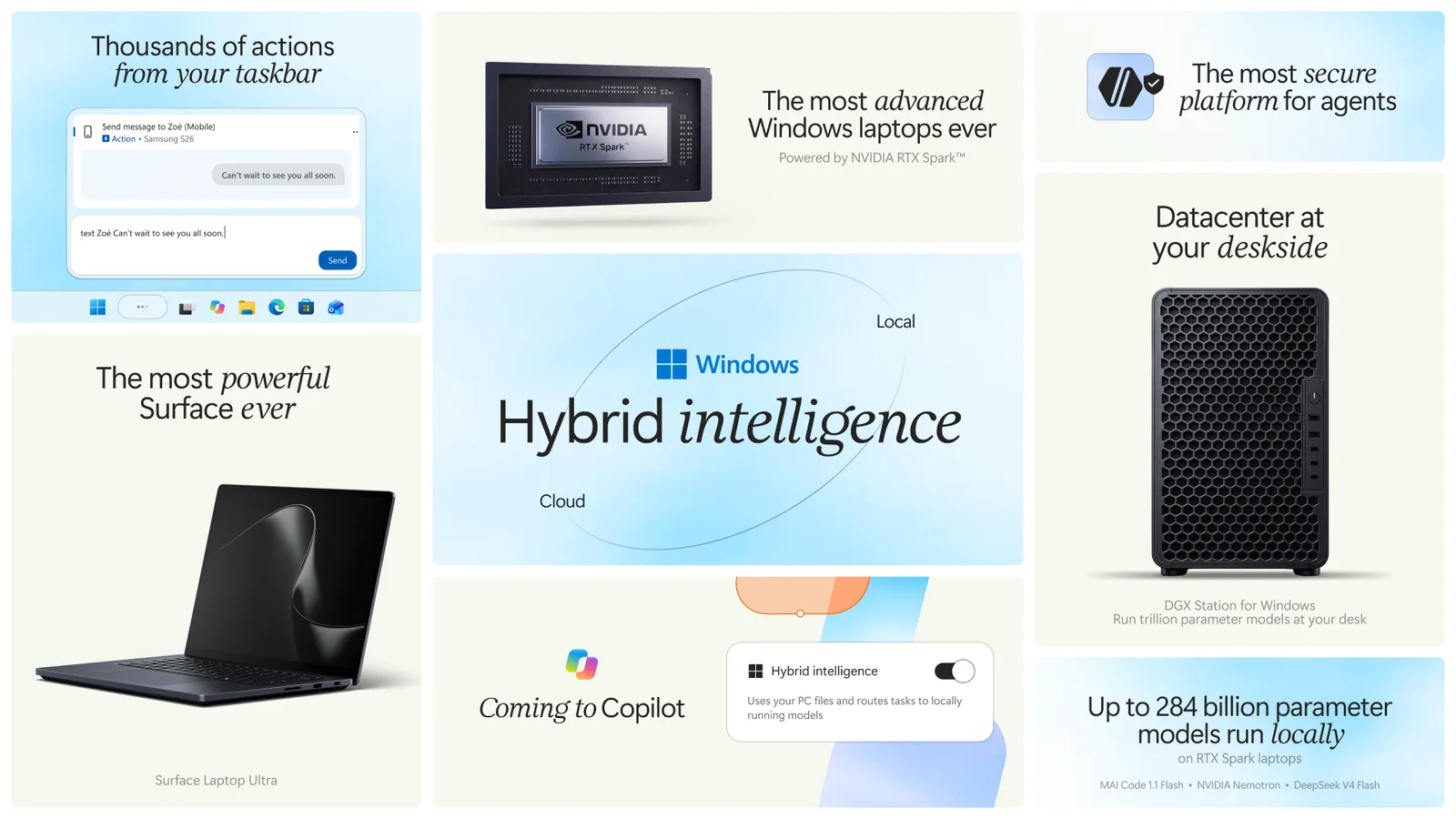
Microsoft calls the shift "building Windows for hybrid intelligence." Instead of routing every prompt to the cloud, Windows will decide whether to run work locally or remotely, using local models when possible and tapping cloud endpoints when the task demands it. Copilot will be able to act on your behalf, read local context and run inference on the machine itself, with your permission. That means faster responses, lower API bills and no need to send sensitive data off-premises every time someone asks a question. If your marketing team in Dubai wants to train an AI course in Dubai prompt workflow on confidential product briefs or customer personas, local execution keeps that data on your devices.
What Microsoft announced
Microsoft Execution Containers (MXC) is now generally available on Windows 11. It provides policy-driven containment for AI agents, with enforcement at runtime. Organizations define which files, folders and network endpoints an agent may access, and Windows enforces the rules whether the agent runs in a process, a session, WSLc (Windows Subsystem for Linux containers), a virtual machine or Windows 365 for Agents. MXC works across operating systems, but Windows offers the widest range of isolation options.
Agents that support MXC today include Codex from OpenAI, GitHub Copilot, OpenClaw, Replit, LM Studio, OpenShell from NVIDIA and Unsloth AI. Anthropic Claude Code, Box, Egnyte, Heidi Health, Hermes Agent by Nous Research, Manus, Perplexity, Raycast and Simular are among the agents that will add MXC integration in the future. Meta's Muse for Windows is coming soon as a native app with MXC integration, according to the Windows Experience Blog.
Microsoft also announced simpler setup for AI agents on mini desktop PCs, with OpenClaw getting a native Windows gateway and MXC integration out of the box. GitHub Copilot will soon route tasks intelligently between local and cloud execution on Windows.
How the new Windows AI agents work
Microsoft Execution Containers enforce boundaries for AI agents the way you would sandbox any privileged process. When an agent tries to read a file or call an API, the operating system checks the policy first. If the policy denies access, the request fails, even if the agent was compromised or its prompt was manipulated. On Windows, you can run an agent in a lightweight process container if you trust it, or isolate it in WSLc or a full virtual machine if you do not. Windows 365 for Agents extends that model to cloud-streamed desktops, so a remote agent instance can run in a dedicated Cloud PC with its own policies.
For personal PCs outside of enterprise management, the safeguards are built into the agent experience itself. Users still get the security benefit, but without needing to configure policies manually.
The hybrid intelligence layer decides where to run each task. When Copilot receives a prompt, Windows evaluates whether the PC has enough memory, compute and the right local model to handle it. If so, it runs the inference locally. If the task is too large or requires a bigger model, it routes to the cloud. With the user's permission, Copilot will be able to read local files, understand the context of what is on screen and act on the user's behalf, such as drafting an email or summarizing a document. No public date has been set for when these Copilot features will be available; Microsoft described them as future capabilities.
New hardware and availability
NVIDIA announced RTX Spark, a new GPU platform for local AI, at the same event. RTX Spark laptop pre-orders opened on October 7, with devices shipping October 16. Compact desktops will go on sale in November. Partners include Acer, ASUS, Dell, HP, Lenovo, Microsoft, MSI and Gigabyte, according to the NVIDIA blog.
Microsoft's Surface Laptop Ultra is built around RTX Spark, offering up to 128 GB of unified memory and up to a petaflop of AI compute. NVIDIA also previewed the DGX Station for Windows, a desktop workstation aimed at developers building local AI agents. Pricing for Surface devices and other hardware was not disclosed. UAE availability for the Surface Laptop Ultra and RTX Spark devices has not been confirmed yet.
MXC itself is available now on Windows 11 for organizations and individuals running supported agents. The Windows Developer Blog has technical documentation for IT teams.
What it means for UAE businesses
If your Dubai-based team uses AI agents for code generation, customer-support drafts or content research, you can now enforce data boundaries without banning the tools. A property developer using an agent to draft listing descriptions can restrict the agent to the marketing folder and block access to finance or client personal data. An agency writing social-media copy for a healthcare client can isolate the agent from unrelated client folders. That makes compliance easier under UAE data-protection expectations and client NDAs.
Local inference cuts latency and cloud-API costs. Running a 70-billion-parameter model locally on a Surface Laptop Ultra or RTX Spark desktop means no round-trip to a US or European data center. For real-time use cases like live chat suggestions, design feedback or web design QA prompts, the speed difference is noticeable. For high-volume workflows, such as generating hundreds of product descriptions or analyzing call transcripts, local models can slash your monthly OpenAI or Anthropic bill.
Hybrid routing also means you stop paying for cloud compute when the task fits on the device. A 1,500-word blog outline does not need GPT-5 in the cloud if a local 13B model running on your laptop can draft it in three seconds. The cost savings compound fast across a 20-person marketing team.
How to get ready
First, inventory which AI agents your team already uses. Check whether each one appears on the MXC support list or the roadmap. If you run GitHub Copilot, Replit or LM Studio, you can start testing containment policies today. If you rely on Claude Code, Perplexity or Raycast, note that MXC integration is coming but not available yet.
Second, decide what data boundaries matter. Map your file shares, network drives and cloud storage by sensitivity. Define which agents should see customer data, financial records or proprietary code. Document the policies before you configure them in Windows, so IT and legal agree on the rules.
Third, evaluate hardware refresh timing. If your team is due for new laptops in the next six months, Surface Laptop Ultra or an RTX Spark device from Acer, ASUS, Dell, HP or Lenovo will let you run local models that today require a cloud API. The upfront cost may be offset by lower subscription fees and faster iteration cycles.
Fourth, train your team on prompt workflows that take advantage of local context. If Copilot can read your screen, reference open files and act on your behalf, the way you structure prompts will change. TDA Academy in Dubai is updating its curriculum to cover these hybrid-intelligence patterns. If you want your marketers, salespeople or ops teams to use AI agents safely and effectively, structured training pays off faster than trial and error.
Finally, test agent isolation in a staging environment before rolling it out to production. Spin up a Windows 365 for Agents instance or a local WSLc container, load an agent and verify that file-access denials work as expected. Check logs, measure performance overhead and document any friction points. Once you have a working configuration, publish the policy template for other teams.
Microsoft Execution Containers and hybrid intelligence make AI agents safer, faster and cheaper to run at scale. For UAE businesses that have held back from deploying agents because of data-security or cost concerns, October 7 removed two of the biggest blockers. If you are ready to put agent containment and local models into production and want expert guidance on strategy, rollout and team training, contact us to discuss your roadmap.
Frequently asked questions
- What are Microsoft Execution Containers for Windows AI agents?
- Microsoft Execution Containers (MXC) is a policy-driven containment system for AI agents on Windows 11, announced October 7, 2026. Organizations define which files and networks each agent can access, and Windows enforces the policies at runtime using process isolation, WSLc, virtual machines or Windows 365 for Agents.
- Which AI agents support Microsoft Execution Containers now?
- Agents that support MXC today include Codex from OpenAI, GitHub Copilot, OpenClaw, Replit, LM Studio, OpenShell from NVIDIA and Unsloth AI. Anthropic Claude Code, Box, Egnyte, Perplexity, Raycast and others will add support in the future.
- Are Windows AI agents and Surface Laptop Ultra available in the UAE?
- Microsoft Execution Containers are generally available on Windows 11 now, so UAE businesses can use them with supported agents. UAE availability for the Surface Laptop Ultra and NVIDIA RTX Spark devices has not been confirmed yet. Pricing for the new hardware has not been disclosed.
- How does hybrid intelligence work on Windows 11 for AI agents?
- Hybrid intelligence lets Windows decide whether to run an AI task locally or in the cloud. With the user's permission, Copilot will be able to use local context, access files on the PC, act on the user's behalf and run inference on local models when the device has enough memory and compute. This feature is described as coming in the future, with no public date set.
Adam ShaksEditor-in-Chief
Adam Shaks is Editor-in-Chief at The Digital Agency. An AI engineer and business growth consultant with more than 15 years across technology, product and marketing, he sets the editorial direction here and advises UAE businesses on where AI, automation and digital strategy genuinely move revenue rather than just headcount. He writes about the practical side of building, launching and growing digital products in the Gulf.